Log transformed parameters
Intro
A researcher is using numerical optimization to find the maximum of a likelihood function, that is, they are fitting a model to data. One of the parameters of this model is the standard deviation of the normal distribution, and as a consequence, it is constrained to positive real numbers. The optimization algorithm the researcher is using does not allow for constraints, which means that the algorithm might sometimes try to evaluate the objective function with a negative value for the standard deviation, resulting in a failure. To circumvent this, the researcher transforms the standard deviation to the logarithmic scale: now negative numbers are also accepted and don't result in the optimization routine failing.
What does this mean in practice? What is the logarithm transfrom, and how to use it with optimization problems such as just described? How about Markov Chain Monte Carlo methods, how can parameter transformations be used in that context?
Parameter transformations are common in statistics, but they can also be a bit arcane and there's a lot of terminology to navigate through. It might be hard to find practical introductions into how to implement these transformations. This text is intended as a gentle introduction to parameter transformations. I'll discuss the simple and ubiquitous logarithm transformation in the context of maximum likelihood estimation and MCMC sampling, and show how to impement these in R.
I'll assume that you, dear reader, have some familiarity with statistics, such as what are distribution functions, or what likelihood functions are. (Why else would you be reading stuff about parameter transformations in the context of maximum likelihood estimation or MCMC sampling...).
What is the logarithm function?
Let us start by exploring the log function in R, and just throw a few numbers at it and see what it outputs:
> log(-1) [1] NaN Warning message: In log(-1) : NaNs produced > log(0) [1] -Inf > log(0.1) [1] -2.302585 > log(1) [1] 0 > log(2) [1] 0.6931472 > log(3) [1] 1.098612
The logarithm function is defined only for positive real numbers, which is why inputting the number -1.0 to it results in NaN. Logarithm of zero is negative infinity (-∞) and logarithm of one is zero. This means that the whole range of numbers between 0 and 1 is stretched to the range -∞ to 0.0. After this the function decelerates: log(2) ≈ 0.7 and log(3) is only ≈ 1.1.
This is shown graphically in the figure below, for some inputs. On the upper axis is the original variable, x, on the lower axis the transformed variable. The (dashed) lines show how the input and outputs to the log function are related.
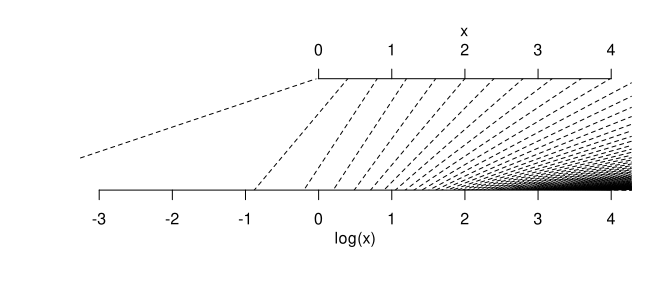
What is important to note is that before 1.0 (on the original scale) the logarithm transform stretches the scale and after that it starts squeezing the scale.
Another way of viewing this is to look at the input variable on the x-axis and the output (logarith transformed) on the y-axis. Like so:
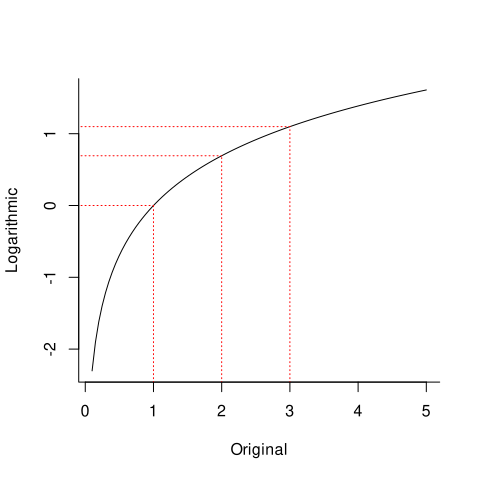
The red dashed lines show the (already familiar) points: log(1) = 0, log(2) ≈ 0.7 and log(3) ≈ 1.1.
Function and its inverse function
We also need to understand what a function and its inverse are. Luckily, this is not that hard. Think, for example, multiplication. In some sense division is its inverse: we can "undo" multiplication by using division.
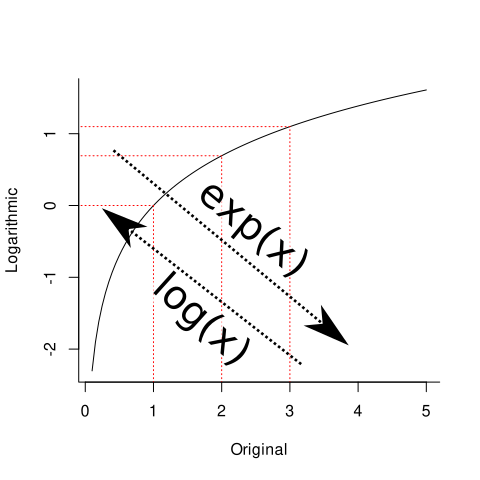
The function that undos logarithms is the exponential function, exp() in R:
Let us try this in R:
> log(5) [1] 1.609438 > exp(1.609438) [1] 5
As you can see, using the exponential function on the logarithm transformed value we ended up back where we started from. You can try this with a couple of different numbers to assure yourself that this always works.
In summary: log() tranforms the original scale to the logarithmic scale and exp() transforms the logarithmic scale to the original scale.
Maximum likelihood estimation
Let us first consider this in the context of how to find the maximum likelihood estimates for the parameters of the normal distribution using numerical optimization.
The likelihood function for this problem is (R pseudocode below)
prod(dnorm(y, mu, sd))
which states that the likelihood of the parameters μ and σ is the product of the values of the normal probability distribution function at points y; and y is the observed data set. Finding the values of μ and σ that maximize the likelihood is analogous to finding the normal distribution that "best matches" the distribution of the data, y.
Usually the log likelihood is preferred, since this allows one to change the product into a sum. This is done simply by taking the logarithm of normalPDF:
sum(dnorm(y, mu, sd, log = T))
And the final modification: since most optimization routines minimize functions as a default, we define the negative log-likelihood function
-sum(dnorm(y, mu, sd, log = T))
since minimizing this function is the same as maximizing the original.
Let us use the heights of black cherry trees from R's built-in data set trees
y = datasets::trees[,2]
which contains the following measurements (in feet):
> y [1] 70 65 63 72 81 83 66 75 80 75 79 76 76 69 75 74 85 86 71 64 78 80 74 72 77 81 82 80 80 80 87
Next we define the objective function as, well, a function in R. Due to R's vectorization powers, this is very simple. But let us first define it without the transformation. One could write the objective function like this:
negLogLikelihood = function(theta, y){
negLL = -sum(dnorm(y, theta[1], theta[2], log = T))
return(negLL)
}
The first input (theta) to the function, called theta, contains the parameters of the model. theta[1] = μ and theta[2] = σ. The second input (y) is the dataset.
The problem with this version is that if we use an optimization routine that does not support constraints, it mighst sometimes try a negative value for theta[2], which (in R) results in NaN and, depending on how error handling is implemented, might result in the optimization routine failing beyond the possiblity of recovery.
The solution is to log transform theta[2]. Perhaps the most mind boggling aspect of how this is done in practice is that there will be no calls to the log() function at all! Actually, the opposite happens: we will be making calls to the inverse transform, exp().
This is because the optimization algorithm already functions on the transformed scale. This might seem strange: how does the algorithm know to use the log transformed standard deviation? Well, of course it doesn't: it is really the inverse tranform that we apply to the parameter that kind of post hoc determines the scale that the optimization algorithm is working on: if we exponentiate the sampled parameter, this means that the algorithm was implicitly working with a log transformed parameter.
When we implement the log transform, the objective function becomes this:
negLogLikelihood = function(theta, y){
negLL = -sum(dnorm(y, theta[1], exp(theta[2]), log = T))
return(negLL)
}
Next, we will use base-R's BFGS optimization routine to find the minimum of the negative log likelihood function. The starting values (first input to optim) were chosen by selecting a random observation from the dataset as the initial guess for μ and the initial value for log(σ) was just, well, guessed (note that the initial value for theta[2] has to be on the log scale!):
fit = optim(c(83, 0), method = "BFGS", negLogLikelihood, y = y)
Given that the optimization routine was able to find the global minimum (you should always inspect the convergence flag and the message in the object returned by the optim function, however, even these don't always reveal errors), we can now inspect the maximum likelihood estimates:
> fit$par [1] 76.000000 1.835489
But wait! The second estimate is still on the logarithmic scale, so we have to transform it back to the original scale using the inverse transfrom. Like so:
> exp(fit$par[2]) [1] 6.2682
These estimates should be close to what we get simply by just calculating the mean and standard deviation of the y (they are closed from solutions). Note that we have to calculate these by hand, since by default R calculates the sample standard deviation, which is not the maximum likelihood estimate:
p = rep(1/length(y), length(y)) E = sum(y * p) SD = sqrt(sum((E - y)^2 * p)) > E [1] 76 > SD [1] 6.268199
The estimates found using optimization and the closed form solutions seem to be close enough. There's some numerical error, but that's inevitable, and could be lessened by tweaking the parameters of the optimization routine.
R code for the optimization example can be found from here
MCMC sampling and Jacobians
Parameter transformations are ubiquitous in the world of MCMC sampling. As a simple example, for which the ground truth is known, let us look at using the Metropolis algorithm to sample from Gamma distribution. In the figure below is a Gamma distribution with parameters shape = 3 and rate = 1:
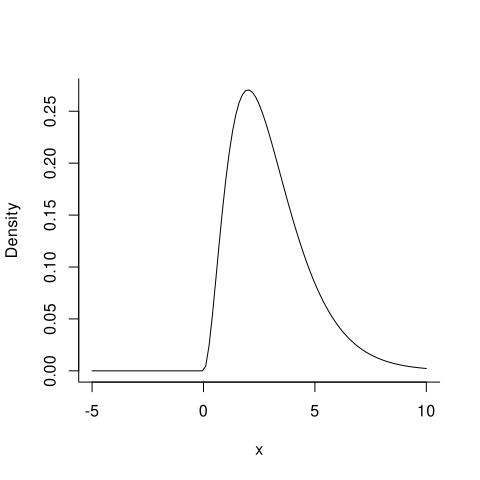
The Gamma distribution is defined only for positive real numbers, however, the Metropolis algorithm works on the unconstrained scale. For this reason it might be useful to think of the samples as being log transformed.
We have to take into account the aforementioned stretching/squeezing of the scale.
Jacobian
What we have to imagine is that the MCMC chain samples uniformly on the transformed scale, in this case log transformed scale. When we do the inverse transform, due to its non-linearity, it changes the density.
We already discussed how the log transform affects the original scale. Let us now be a bit more mathematical about that. The amount of stretching/squeezing is related to the rate of change of the function. The rate of change of a function is called its derivative, which in turn is the slope of tangent line drawn at some point on the function. The interactive figure below shows the exponential function and the tangent line for the chosen x. Try changing x and see how the derivative (slope of the tangent line) behaves:
As you undoubtedly noticed, the derivative is smaller when x is small and vice versa. See what happens to the derivative on different sides on 0.0. When the absolute value of the derivative is > 1.0, the scale gets stretched and when its < 1.0 the scale is squished.
Metropolis algorithm
So, we are interested in sampling from the Gamma(3,1) distribution using the Metropolis algorithm. We might program the target distribution for example like this
target = function(theta){
dgamma(theta, 3, 1)
}
However, since the Metropolis algorithm uses a symmetric proposal distribution, some of the proposals might fall outside if the support of the distribution (i.e. they might be negative) so they are discarded by default or even (if error handling is not implemented) cause other problems with the algorithm. To make sampling more efficient/stable, we might again imagine that the samples are on the log scale, and implement the inverse transformation inside the target density:
target = function(theta){
dgamma(exp(theta), 3, 1)
}
This ensures that all of the samples will always be inside the support of the target distribution. However, we now have to take into account the stretching induced by the transformation.
Mathematically, the derivative of exp(x) is exp(x) [1], but we need the absolute value of this, since we are interested in the amount of change, not its direction. The result is called the Jacobian. The Jacobian, then, is the absolute of the derivative of the inverse transformation. Huh! Here the transformation is, of course, the logarithm transformation and as we discussed, its inverse is the exponential function. We will use J to indicate the Jacobian, and please note that the x variable is on the original unconstrained scale:
J = abs(exp(x))
The target density has to be multiplied by this term. In this case we get
dgamma(x, 3, 1) * J
In this particular case this term will be small when x is small. This results in the values nero zero having a lower weight:
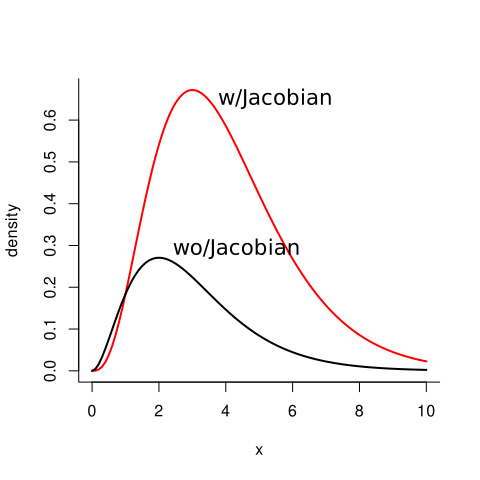
Intuitively this is easy to comprehend by taking a look at how the exponential function behaves (take a look at the figure above with the arrows).
When we exponentiate numbers between ]-∞ 0] they end up between [0, 1]. In plain English: half of the number line is squeezed between zero and one! The MCMC sampler doesn't know that this is happening. It is taking the same size and same amount of steps as it would if the scale was untransformed. So when it its exploring negative numbers, it thinks that it's exploring one half of the real number line when in reality it's exploring numbers between zero and one..
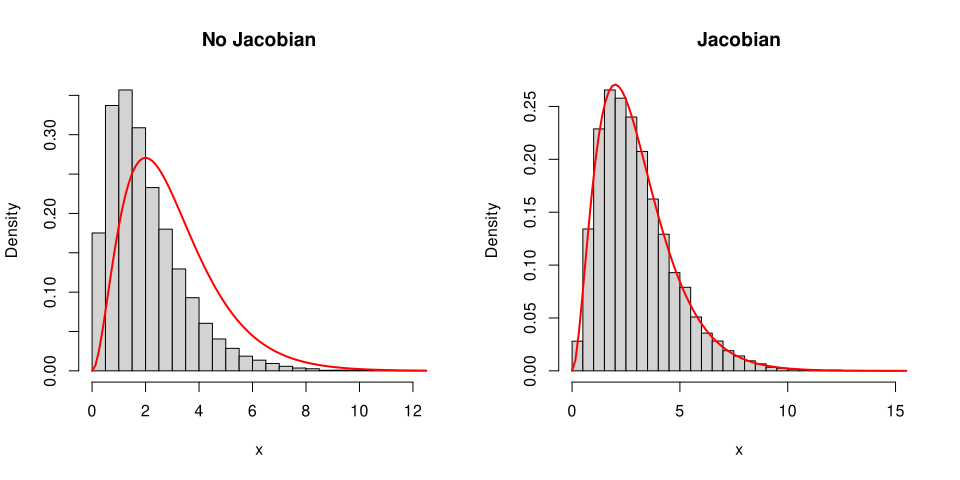
To demonstrate the effect the Jacobian adjustment has, in the next example there are two different target densities: one with the Jacobian and one without and the metropolis algorithm is run on both of them.
target_wo_jacobian = function(theta){
dgamma(exp(theta), 3, 1)
}
target_w_jacobian = function(theta){
dgamma(exp(theta), 3, 1) * abs(exp(theta))
}
Note that when calculating the correction, we use the unconstrained value of theta. Remember that the Metropolis algorithm is implicitly working on the logarithmic scale, and in order to calculate the derivative of the logarithm transformation, we need the value of theta on the that scale.
Let us see what happens when the Metropolis algorithm is run on both of these target densities:
runChain = function(target){
NIter = 50000
x = rep(NaN, NIter)
x[1] = log(runif(1, 1, 10))
for(i in 2:NIter){
proposal = rnorm(1, x[i-1], 1)
P_accept = target(proposal) / target(x[i-1])
if(runif(1) < P_accept){
x[i] = proposal
} else {
x[i] = x[i - 1]
}
}
return(x)
}
samples_wo_jacobian = runChain(target_wo_jacobian)
samples_w_jacobian = runChain(target_w_jacobian)
The figure below shows the estimated density (histogram) against the true target density (red line) for both cases: when including the Jacobian and when the Jacobian is not included (R code below):
par(mfrow = c(1,2))
hist(exp(samples_wo_jacobian), prob = T, main = "No Jacobian",
breaks = 30, xlab = "x")
curve(dgamma(x, 3, 1), add = T, col = "red", lwd = 2)
hist(exp(samples_w_jacobian), prob = T, main = "Jacobian",
breaks = 30, xlab = "x")
curve(dgamma(x, 3, 1), add = T, col = "red", lwd = 2)
R code for the MCMC example is here
Outro
I hope this text has given you some practical tools for working with, at least, the logarithm transformation.
In upcoming texts I'll discuss other transformations besides the log transformation, and what to do when multiple parameters are transformed at the same time.
Sources & Literature
[1]. Derivatives for common functions can be found from e.g. the website Math is Fun: https://www.mathsisfun.com/calculus/derivatives-rules.html
Jacobian adjustments are discussed in manual for Stan: https://mc-stan.org/docs/2_28/stan-users-guide/changes-of-variables.html
Krushcke, J. (2015): Doing Bayesian Data Analysis – A tutorial with R, JAGS and Stan, 2nd Edition. Jacobians are discussed in Section 25.3. Reparameterization.
Gelman, A., Carlin, J., Stern, H., Dunson, D., Vehtari, A., & Rubin, D. (2014): Doing Bayesian Data Analysis, 3rd Edition. Jacobians are discussed in Section 1.8 Some useful results from probability theory.